
Document and spreadsheet work, without the chaos.
Docsandria centralizes your files with version history, sharing permissions, templates, activity logs, and a clean interface designed for teams that move fast.




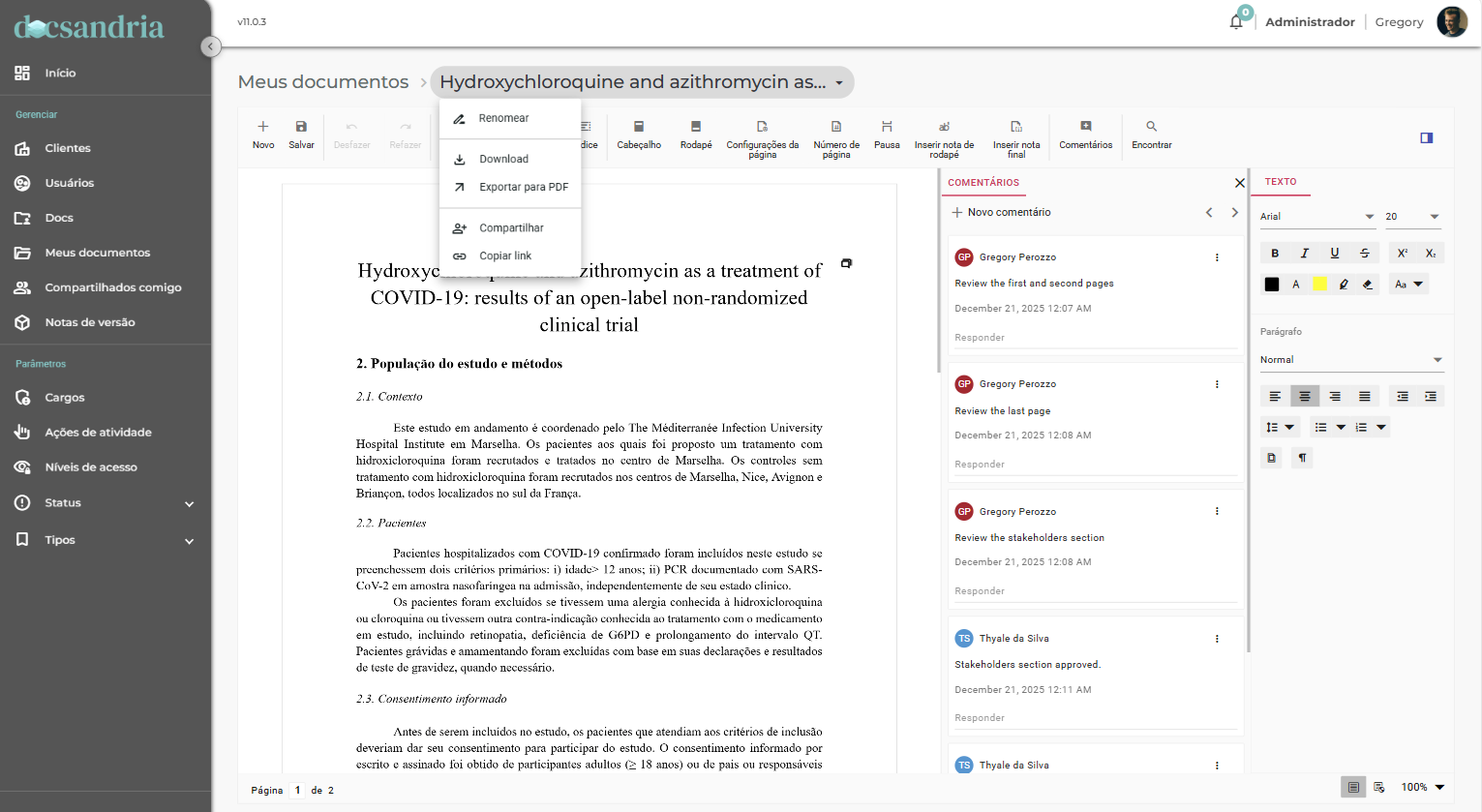
Operational-grade feature stack for governed documents
Built for teams that need clarity, control, and momentum on every file.
Digital-first by design
Docsandria is built from the ground up for digital workflows. No paper baggage, no legacy constraints—just modern document management that feels natural and efficient.
How it works
From upload to audit-ready history in minutes.
Create a workspace
Organize files into folders, set naming conventions, and keep everything searchable.
Edit documents online
Work with DOCX and XLSX in the browser with version tracking built in.
Share with control
Invite users and assign access levels so the right people can view or edit.
Review history
Audit activity and versions to know who changed what, when, and why.
Export & download
Download completed documents as PDF or in their original format with a single click.
Notify stakeholders
Send automatic notifications when documents are ready, updated, or require action.
Docsandria schedules certain background operations during off-peak hours, which may reduce carbon emissions depending on regional grid conditions.
Permissioned access, activity logging, and clean separation of concerns
Docsandria is built around secure-by-design principles: scoped access, share controls, and event logging. Your team gets the speed of modern web apps with the control you need for sensitive documents.
- Share links and direct sharing with access levels
- Activity logs per user and per document
- Version history with predictable retention
- End-to-end encryption for data at rest and in transit
- Role-based access control with granular permissions
- Built-in compliance support for ISO 9001 document control requirements
Roadmap
What we are building next to expand collaboration and governance.
Real-time collaboration
Co-author documents with live presence indicators, conflict-free editing, inline comments, and @mentions for seamless team collaboration.
AI-powered search & insights
Smart document search with AI-powered content understanding, automatic tagging, and intelligent document recommendations based on your work patterns.
Two-factor authentication (2FA)
Enhanced account security with multi-factor authentication support including SMS, authenticator apps, and hardware keys for enterprise-grade protection.
Custom workflows & automation
Build custom approval workflows, automated document routing, and smart triggers to streamline your document management processes.
Third-party integrations
Connect with popular tools like Slack, Microsoft Teams, Google Workspace, Salesforce, and more. Plus comprehensive REST API for custom integrations.
Expanded file format support
Support for additional document formats including TXT, RTF, Markdown, and image formats. Enhanced import/export capabilities for seamless workflow integration.
Mobile apps (iOS & Android)
Native mobile applications for on-the-go document access, editing, and collaboration. View, edit, and approve documents from anywhere.
Our roadmap is shaped by customer feedback and evolving needs. Timelines may adjust to ensure we deliver the highest quality features.
Pricing
Simple per-user plans that scale from individual workspaces to teams.
Frequently asked questions
Clear answers for security, ownership, and onboarding.
Ready to bring order to your document chaos?
Join thousands of teams who have already transformed their document management with governance, clarity, and speed.